For software teams with customers
Your support tool costs more per seat than your database
Formala is a flat monthly price with the AI included: no per-seat line, no charge per resolved ticket. Your team works one inbox with states, assignment, macros, private notes and targets that pause overnight, and the assistant answers what your docs already cover.
A scripted example, not a real conversation.
Why small teams switch
Three things that go wrong as a support team grows.
01
The bill grows with the team, not the work
Two more people is two more seats, whether or not the queue got any longer. Then the AI is charged again, per resolution, on top.
$237
1 person
$276
2
$315
3
$354
4
$393
5
Intercom seatsFin AIFormala Pro In Formala: Formala is a flat $79 a month on Pro, with the AI included. Your fifth person costs what your first did.
02
Most of the queue is already answered somewhere
The same eight questions, already written up in your docs, retyped by whoever is on rota that morning.
In Formala: The assistant answers them on chat from the article you already wrote, and passes on only what the article does not cover.
03
Nobody knows what is late
Nothing says which conversations are waiting on you and which on the customer, or whose turn it is. So the oldest one is whatever nobody wanted to open.
In Formala: Every conversation shows who has it, whether it is waiting on you or on them, and whether it is past its reply-time target.
Intercom Essential at $39 per seat a month, billed monthly, plus Fin at its $0.99 floor on 200 resolutions a month. Formala Pro at $79 a month, billed monthly, including 1,000 conversations. Prices checked 26 August 2026.
What your customer sees
An answer straight away, or an honest “let me get someone”.
The assistant answers from your help articles. When the articles do not cover something, it says so, takes the question down and passes it to your team instead of making something up.
When one of you steps in, the customer is told a person has joined, and the assistant stops replying.
- Asked about
- Export before canceling
- Answered from docs
- Yes
- Couldn't answer
- Whether attachments are included
- priya@westford.example
A scripted example, not a real conversation.
It is a real inbox
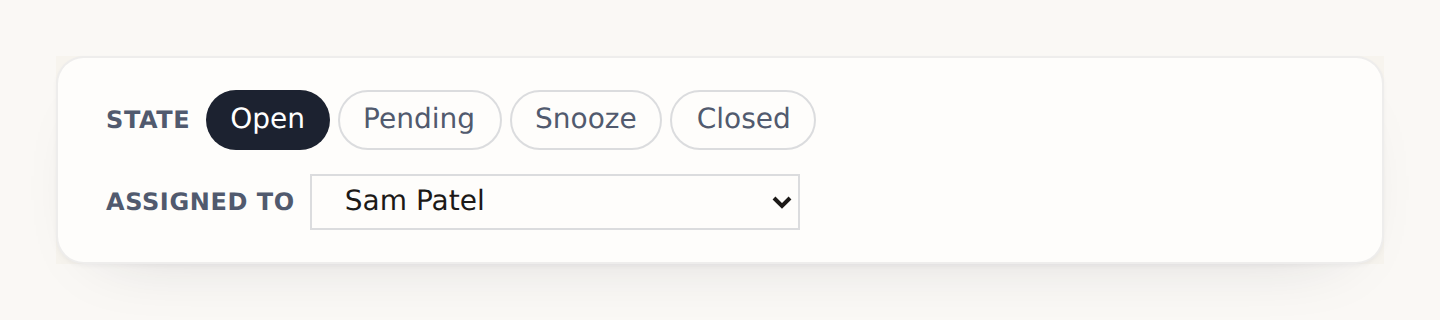
Every conversation has a state and a name on it.
Open, waiting on the customer, snoozed until Tuesday, closed. Assigned to somebody by name, or left for whoever picks it up first.
That is the difference between a queue and a mailbox everyone can see: the oldest thing in a mailbox is whatever nobody wanted to open.
What the assistant is for
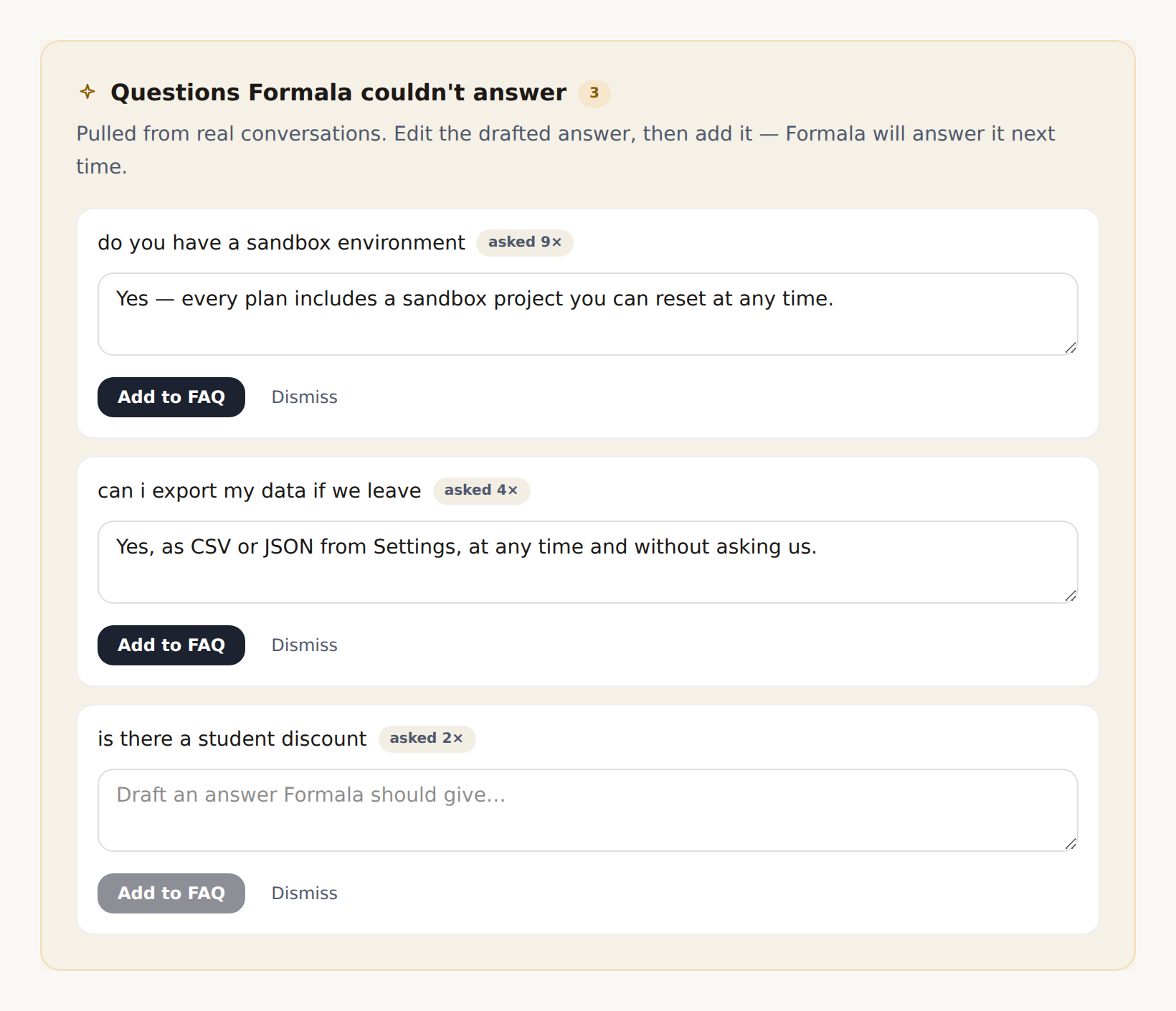
It answers from your help articles, and tells you what it could not answer.
Write the articles once. The assistant answers out of them and declines anything they do not cover rather than inventing it.
What it could not answer comes back as a list, in your customers' own words, with a count beside each one and an answer drafted ready to accept. Your documentation gets better because of what people actually asked.
Targets you can stand behind
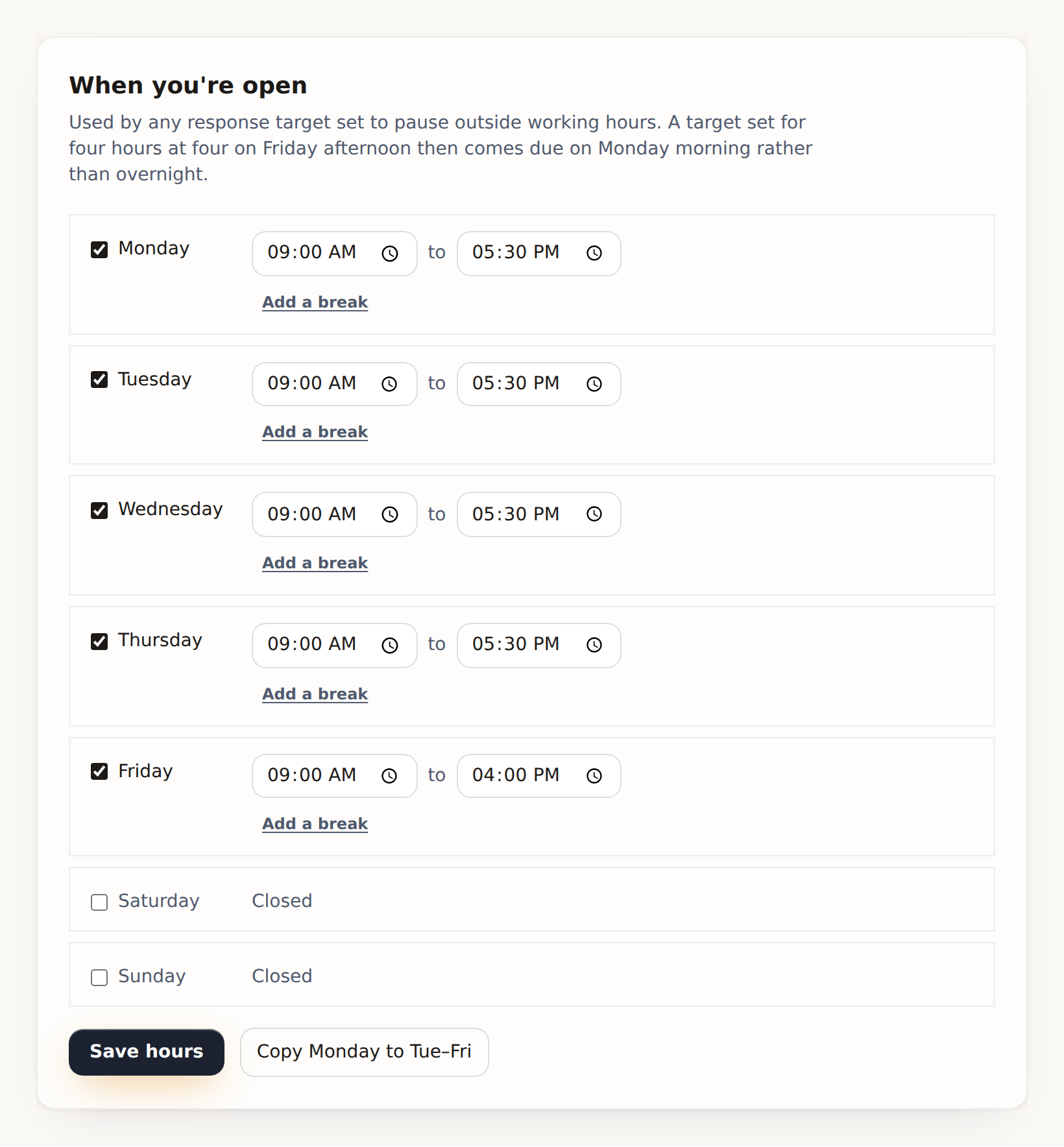
Four hours from Friday teatime is Monday morning.
Set the hours you actually work and a first-reply target measures against them. Split shifts and a short Friday included.
A target that counts through the night is one that reports a breach nobody could have prevented, which is how a team learns to ignore the number.
It still works at five people
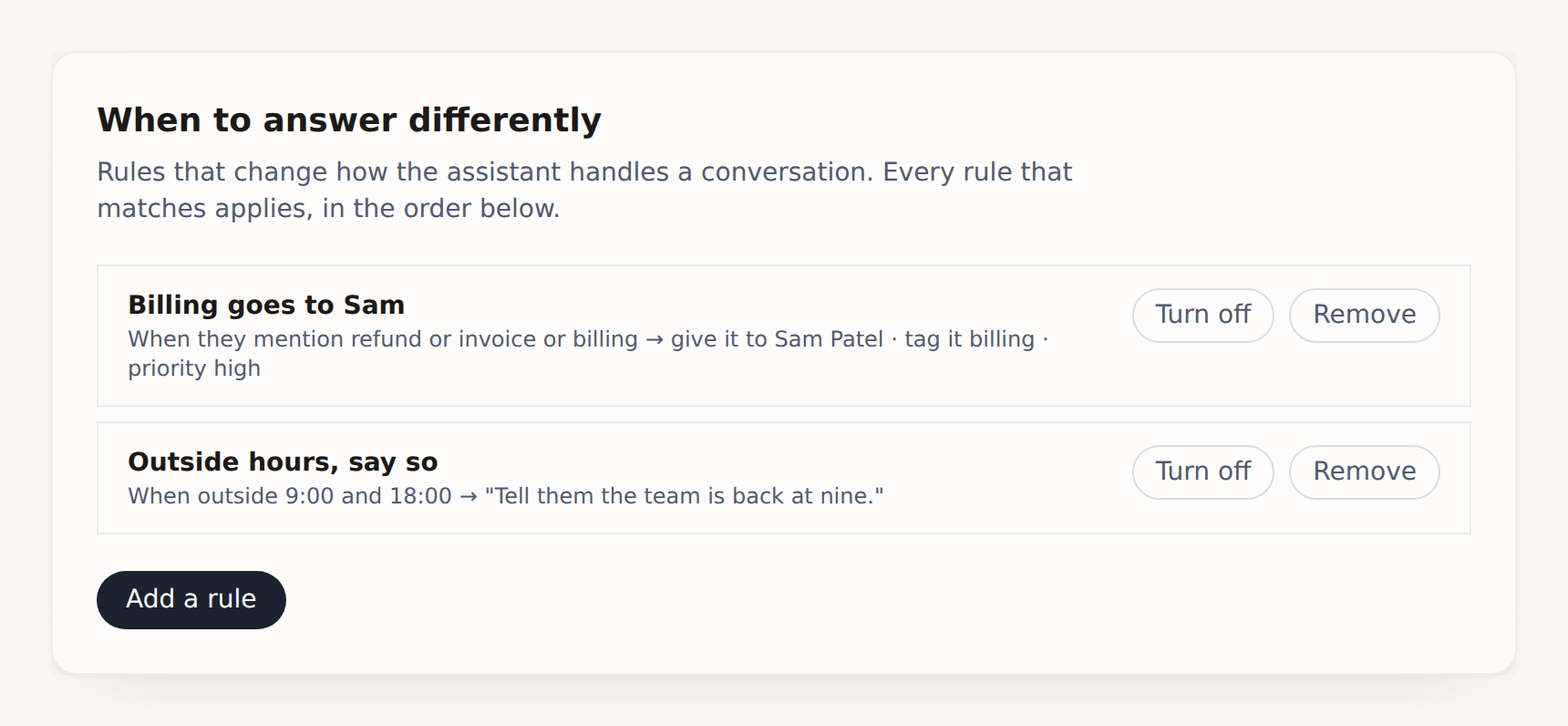
Rules that read the conversation and route it.
Match on the words a customer used, the channel they came in on, whether they have been in touch before, or the time of day. Then assign it to the person who handles that, set its priority, or steer what the assistant says.
A rule reads as a sentence, so the person who wrote it six months ago can still tell what it does.
And the rest of it
What else is in the box.
Answers what your help articles already say
Write the articles once. The assistant answers out of them, publishes them as pages your customers can find, and declines anything they do not cover rather than inventing it. What it could not answer comes back as a list of what your docs are missing, in your customers' own words, with a count beside each one.
One inbox for chat, email and messages
Open, waiting on the customer, snoozed until Tuesday, closed. Assign it, or let it go round the team. Forward a support address and the mail lands here too -- and you reply by email from the same box, threaded, so it arrives in their client as a reply and not a new conversation.
Rules that read the conversation and route it
Match on the channel, the words the customer used, whether they have been in touch before, or the time of day -- then assign it to the person who handles that, set its priority, steer what the assistant says, or fetch a person outright.
Macros, and a hundred at once
A saved reply can close the conversation and hand it to somebody as it sends. And when Monday morning is forty tickets, select them and assign, snooze or close the lot in one go rather than opening each one.
Targets that stop counting at six
Set the hours you actually work and a first-reply target measures against them, so four hours from Friday teatime is Monday morning rather than a breach nobody could have prevented. Split shifts and timezones included.
Says how fast you actually answer
First reply times, whether you hit your target, who handled what, how customers rated it, and how much the assistant closed on its own -- reported as its own number rather than quietly left out of the others. Score a sample against your own rubric when you want to know why.
What your engineer will ask
The install is one line. These are the answers to the questions that usually come next.
- One script tag
- Loaded async, so it never blocks your page. About 50KB gzipped, no dependencies, no build step, nothing to add to package.json.
- It cannot break your layout
- The whole widget renders inside a shadow root. Its styles cannot leak onto your page, and your layout rules cannot reach in and break it.
- Your help center is real pages
- Published at a URL search engines can index, not only inside the chat bubble. The same articles the assistant answers from.
- Inbound email threads properly
- Replies match on RFC References first and a per-conversation address second, so a client that strips one still lands in the right place.
- No cookies
- It sets none. What it needs to remember it keeps in the visitor's own browser storage.
Before you move your inbox
Is this a real helpdesk or a chat widget with tickets bolted on?
An inbox with states, assignment, private notes, saved replies and macros, rules that route on what the customer actually said, first-reply targets measured against your own opening hours, per-person reporting, and a help center your customers can read on the web. What it does not do is reach out of itself -- no rule fires a webhook, no ticket opens in another system. If support has to wake an on-call rota, buy a helpdesk.
How is it priced against a per-seat tool?
Flat monthly, by conversation volume, with the AI included. Your fourth and fifth people cost nothing extra, and a busy week is not a bigger invoice for the AI. That is the whole argument: a small team pays for the work, not for the chairs.
Can two people work the same conversation without stepping on each other?
One person holds a live chat at a time, and everybody else can still leave a private note on it -- so a colleague can say “check their plan first” without taking it off you. An admin can take one over if they have to, and that is recorded. A waiting chat can be offered round the team one at a time instead of sitting in a pile, and a rule can send a whole category to whoever owns it.
Do we have to move our email?
No, and you can. Forward a support address to the one we give you and the mail lands in the same inbox as the chats -- and you answer it from there, by email, threaded on the original so it arrives in their client as a reply rather than a new conversation. Or leave email where it is and use this for the website.
What happens when the assistant does not know?
It says so and takes the question down. Every one of those is logged as a gap in your docs, in the words your customers used rather than the words you would have guessed -- which is the list you write next month's articles from.
Will it answer customers on its own overnight?
On chat, yes, from what you have given it. On email it does not: inbound mail lands in the inbox and a person replies. Automatic email replies are a deliberate opt-in on the top plan, because an AI emailing your customers with nobody watching is a different decision from an AI answering a chat bubble.
How it works
From nothing to live in three steps.
No IT department required. Formala is built for contractors, studios, clinics, agencies, and realtors. Every small team whose next customer starts as a website visitor.
Build it in two minutes
A guided wizard drafts your greeting, the openers visitors can tap, your questions and your FAQs, tuned to your business. You pick a persona and a voice, then tweak anything you like.
Paste one line
Drop a single script tag on your site. That's the whole install. WordPress, Webflow, Shopify, or hand-written HTML.
<script data-form-id="frm_a1b2c3d4" />Get real leads
Formala greets visitors, presses for specifics, and hands you a structured lead in your dashboard and inbox.
…and this is what you wake up to.
Not transcripts to read. Leads to call. Every conversation arrives named, categorized, prioritized, and summarized.
Dashboard
Leads
2 new leads waiting · 1 marked high priority
- 2m ago
Wedding for 120 guests in June, budget around $8k. Wants a call this week.
Priya ShahEventsHigh priority
- 1h ago
Website redesign with a Q3 launch, budget around $30k. Ready to scope.
Marcus LeeSales
- 3h ago
Asked for a balayage on Saturday morning and left a number to confirm on.
AnonymousBooking
- Yesterday
Bathroom remodel, roughly $15k, hoping to start next month.
Sam RiveraSales
Pricing
Simple pricing. Every core feature included.
10 conversations a month free, no card. The free plan keeps a small “Powered by Formala” line on the widget, and any paid plan removes it. Every plan has every core feature. Bigger plans add volume, and then Starter adds your own help center and learning from real chats; Growth adds team seats; Pro adds the AI follow-up engine and sending from your own domain; Business adds auto-sent AI replies. How billing works →
Free
$0/mo
10 conversations / month
no card, ever
- Every core feature
- Formala badge stays on the widget
Starter
$19/mo
150 conversations / month
about 13¢ per conversation
- Every core feature
- Your own help center
- Learns from real chats
Growth
$39/mo
400 conversations / month
about 10¢ per conversation
- Every core feature
- Your own help center
- Learns from real chats
- Team seats
Pro
$79/mo
1,000 conversations / month
about 8¢ per conversation
- Every core feature
- Your own help center
- Learns from real chats
- Team seats
- AI follow-up engine
- Send from your own domain
Add voice: let visitors talk to it out loud
A microphone in the chat. Visitors speak instead of typing and hear the answer back, and you get the same transcript and the same lead as any other conversation. Works with any plan, on as many forms as you like.
$59/mo200 spoken minutes a month
Not sure what something does? Every feature, explained in plain English →
Every plan starts on the free one: no card required, cancel anytime. If Formala catches one job you'd have missed, it's paid for itself.
Priced for small businesses, not enterprises.
You get the qualifying, structuring, and follow-up you'd expect from tools that cost far more, at pennies per conversation.
| Formala | A plain contact form | Chat / chatbot suites | |
|---|---|---|---|
| Turns vague visitors into qualified leads | — | Limited | |
| Clean, structured leads, no transcripts to read | Limited | — | |
| Answers 24/7 and follows up on its own | — | Limited | |
| Live in minutes. One line, no code or setup fees | Limited | — | |
| Your brand, no “powered by” badge (any paid plan) | Limited | — | |
| Typical cost | From $19/mo · ~6–13¢ a chat | Free, but converts like a form | ~$30–130/seat + ~$1 per AI chat |
You pay less at every size
| Chats / mo | A comparable AI form tool | Formala |
|---|---|---|
| 250 | $59/mo | $39/moGrowth · 400 a month |
| 500 | $98/mo | $79/moPro · 1,000 a month |
| 2,000 | $330/mo | $149/moBusiness · 2,500 a month |
Up to ~2.5× cheaper per conversation, and it does more.
Other tools' prices reflect major providers' publicly listed rates (AI form tools by conversation tier; live-chat suites per seat plus a per-AI-answer fee) and may change, so compare current plans before deciding.
Stop losing the visitors who almost reached out.
Set Formala up in the time it takes to read this page.
Start freeNo card required · cancel anytime · your data stays yours